§Use case · Built-in pen · 03
You have a point. The paragraph is not there yet.
The built-in pen works where you are standing: continue the sentence, reshape the argument, tighten the draft. And when a paragraph is doing too much work, a chart or a diagram says it better — drawn from your own text, not from thin air.
The quarter closed flat. Revenue held, and the margin has been squeezed held too, quarter after quarter.
“shorten this without losing the numbers” 1 revision waiting
- Where
- At the cursorIn a paragraph, or over a selection
- Moves
- EightImprove, shorten, tone, translate, reshape, draft, draw, format
- Visuals
- From your textCharts, diagrams, mind maps — nothing invented
- Result
- MarkedA revision with a diff — you accept it
01Short answer
A pen in the margin, not a chat in another tab.
Switching to a chat window costs you the paragraph. So the built-in pen works in place: one instruction, one pass, one result beside the text it would replace. You keep the document; the pen never takes the pen.
Who this is for. You are drafting, reshaping or making a paragraph legible — and you want the help exactly where the cursor is, not three tabs away.
02What to ask
What people actually type at the cursor.
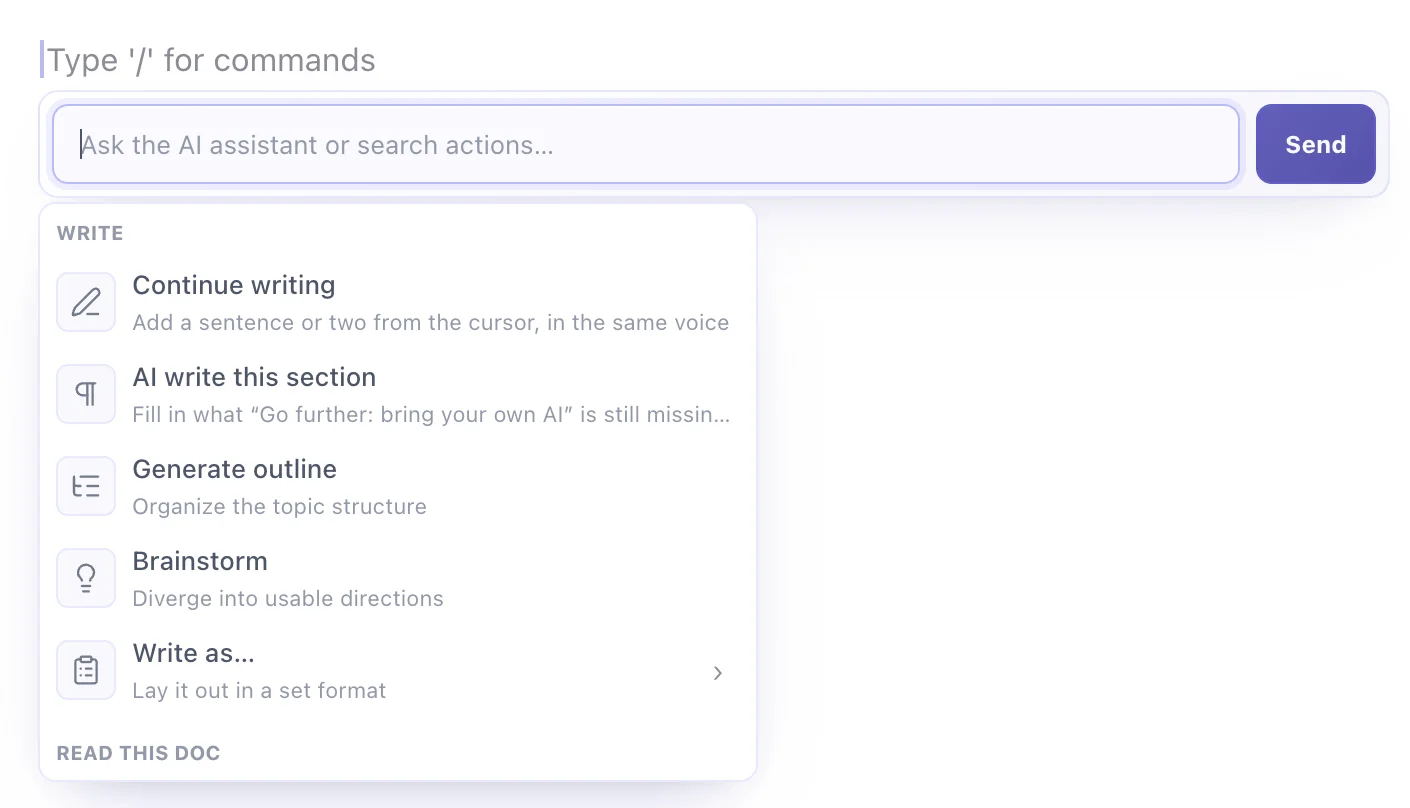
Eight built-in moves sit in the menu — improve, shorten, translate, draw and the rest — and you can type any instruction of your own instead. These are the ones that come up most, ending with one the menu never listed. Each is one pass; the result lands beside the text it would replace.
“Continue this paragraph where I stopped.”
draft · at the cursor
“Shorten this without losing the numbers.”
shorten · 1 revision
“Rewrite this for someone who was not in the room.”
improve · tone kept honest
“Make this list into a table.”
make it into · structure only
“Draw this process as a flowchart.”
draw it · block inserted below
“Chart these four numbers from the paragraph.”
draw it · from the text only
“Tell me whether these two paragraphs contradict each other.”
your own prompt · reads what it needs
03The route
Four moves, one paragraph at a time.
The pen is not a wizard and not a collaborator with opinions of its own. It is a question-answering machine for the text under your cursor — which is exactly why it stays out of the way.
- 01
Write the sentence you have
Even a bad one. The pen works on text that exists — it is not a blank-page oracle, and the paragraph you dislike is the correct input.
- 02
Ask at the cursor
Sit in the paragraph or select the passage, and say what it must do: improve it, shorten it, expand it, change the tone, translate it.
- 03
Accept the revision
What comes back is marked with a diff beside the text it would replace. Take it, reject it, or ask again — it cannot accept its own revisions.
- 04
Draw it when words are not enough
A passage becomes a diagram block — a flowchart, a mind map, a chart — inserted below. Every node traces back to a sentence in your text.
The rule · every pen in the document
What comes back is a revision, not a replacement.
The same rule the connected AI follows. The built-in pen gets no shortcuts for living in the toolbar — it proposes, and a person applies.
Apply its own revisions it cannot accept what it proposed
04Two pens
The built-in pen and your AI app are not competing.
One is in the toolbar and answers in place; the other is the app you already pay for, working across the whole document over MCP. Pick whichever is closer to the sentence you are unhappy with.
Built-in pen TOOLBAR
this editor · weekly credits
- One instruction at a time, pointed at the paragraph under the cursor.
- Result arrives marked, with a diff; you accept it.
- Right tool when the problem is one sentence.
Your AI app MCP
mcp.jotdoc.net/mcp
- Works across the whole current document — sections, not one paragraph.
- Proposes changes across sections; never writes the body.
- Right tool when the problem is structural.
05Visuals
A picture that argues from your text.
When a paragraph becomes a list of steps, numbers or branches, stop writing and draw it. The rule across all six: nothing enters the picture that the text does not already say.
06Boundaries
What this deliberately is not.
“AI writing tool” attracts expectations the product does not meet. Better to say so on this page than after the credit allowance runs out.
Not an illustrator
No image generation, no stock art
It draws diagrams and charts from what the text says. It cannot make you a hero image or invent a data point the paragraph does not have.
Not a chat companion
No conversation thread beside the page
The pen answers with text in the document, not with dialogue. If you want to talk the argument through, that is your AI app over MCP.
Not free-running
One instruction, one pass
Nothing rewrites the document while you are making coffee. Every result is an answer to something you asked, and it waits for a click.
Not a data analyst
It charts the numbers you wrote
No imports, no live sources, no computing your metrics. If the text has four quarters, the chart has four bars.
07Questions
Before you lean on the pen.
Does the built-in pen cost money?
It draws on a weekly credit allowance that refreshes every week — enough for the paragraph in front of you. If you write all day every day, your own AI app over MCP runs on its own subscription instead.
Does it change my text without asking?
No. Every result — a rewrite, a shortening, an inserted diagram — arrives as a revision with a diff, waiting beside the text it would replace. It cannot accept its own revisions; only you click Accept.
What is the difference between this and my own AI app?
Scope and seat. The built-in pen answers one instruction at a time, pointed at the paragraph at the cursor, and costs credits. A connected AI app over MCP works across the whole current document and proposes rounds — better when the problem is structural. Two pens, two jobs.
Where do the charts and diagrams come from?
Your text. A chart numbers only what the paragraph already says; a diagram draws only relations the text states — every node traces back to a sentence. Nothing is invented and nothing is fetched from elsewhere.
Can it translate or reformat?
Yes. Translate is one of the eight moves, and so is making a passage into bullets, a table or headings. Meeting notes, a pros-and-cons breakdown and a status update are built-in formats — select, ask, accept.
The paragraph is one instruction away.
Select it. Say what it must do. Accept the revision.
Weekly credits · results arrive marked