§Features · 01
As easy as Word. As portable as plain text.
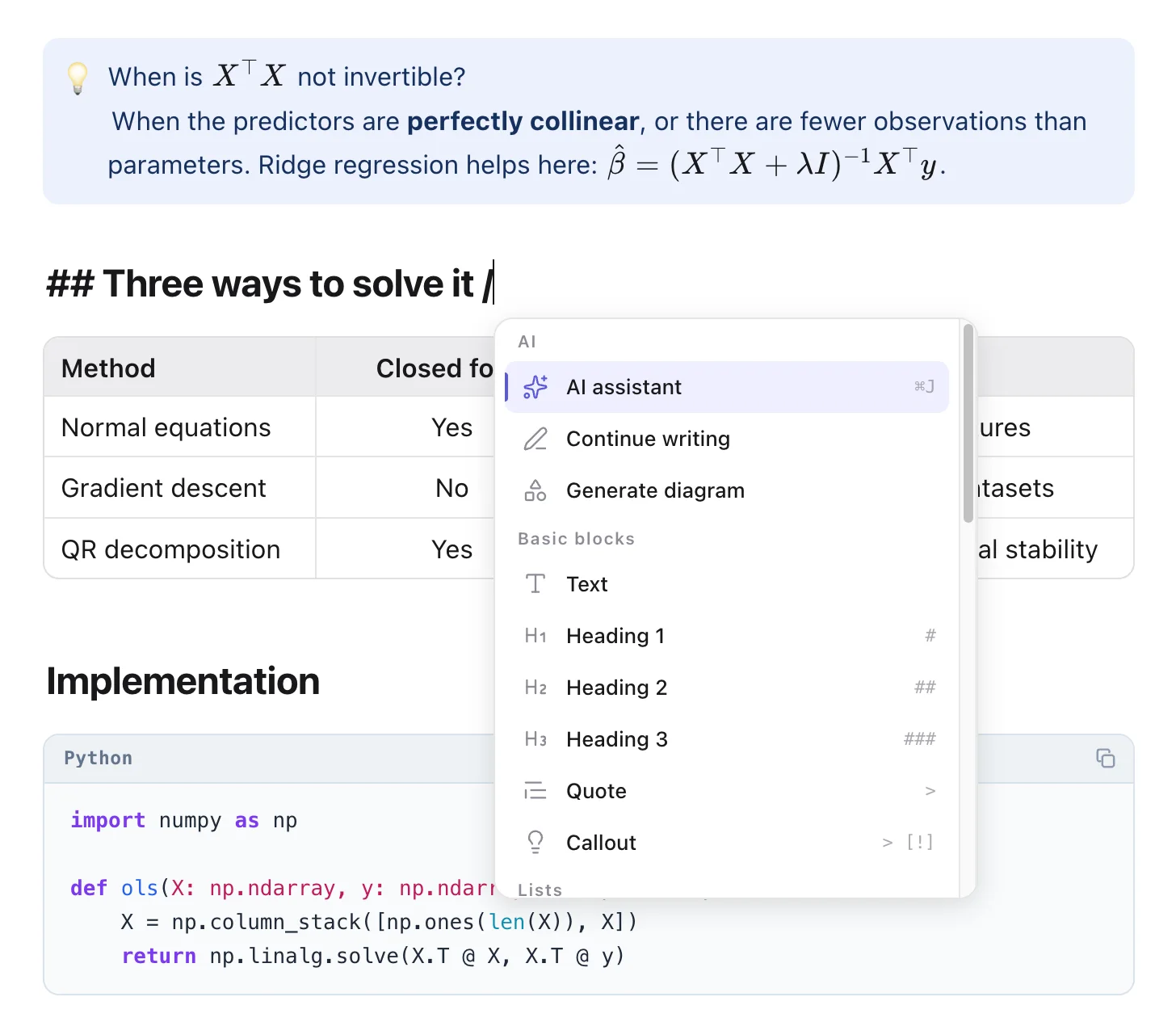
JotDoc looks like the editor you already know: a slash menu, blocks you can drag, familiar shortcuts. Under the hood, every file is plain Markdown, the same format ChatGPT and Claude write in. Paste an AI answer and the headings, tables and formulas land formatted, not as stray #, | and $ characters.
- Source
- MarkdownAn ordinary .md file
- Block types
- Headings to footnotesTables, code, math, diagrams
- Exports
- 4 formatsDOCX, PDF, PNG, Markdown
- Account
- NoneTo write and to export
01Input
Five ways in, and only one of them is typing syntax.
Most people finish a document without learning a single Markdown character. The ones who already know it are not slowed down either: the shortcut and the menu insert the same block.
Slash menu
Type / and a word — /table, /formula, /code, /diagram — and the block appears where the cursor is. This is how most documents get written.
Type /
Markdown shortcuts
# for a heading, - for a list, > for a quote. The shortcuts work because the file underneath really is Markdown.
Optional
Paste
From Word, a web page, ChatGPT or Claude — the rendered answer or the Markdown behind it. Both are parsed into blocks instead of arriving as #, | and $ characters.
Source or rendered
Drag to reorder
Grab a block by its handle and move it. Nothing is cut and re-typed to change the order of a section.
Move a block
Source view
One keystroke to see exactly what will be saved, and to edit it as text. Nothing sits behind a rendering layer you cannot inspect.
Same file
A paragraph is the unit that moves, not a character. That is what makes the export hold together. Pasting an AI answer is the first door in the round trip — the document stays the memory after the chat moves on.
02Transform
Select the prose. Get the picture.
The built-in AI works on the passage you selected: rewrite it in place, write the paragraph after it, or turn it into a diagram or infographic.
After the help-centre rewrite, support tickets fell from 1,180 to 410 in six weeks, median first reply went from nine hours to two, and the three top articles now answer 62% of questions before anyone writes in. The same team handled all of it.
Selection · one credit · nothing lands until you accept
Same team. Two thirds fewer tickets.
Source · the selected paragraph
Rewrite and continue change the text; draw inserts a block below it. Every label stays editable, and the source stays in the Markdown.
03Blocks
Sixteen block types. One text file.
A heading that joins the outline. A list you can tick. A table with a real header row, code that keeps its language, an equation you can select, a diagram drawn from text, a footnote that lands as a footnote. Insert any of them with a slash — and the page keeps reading like a page, not a form.
Where the 8-bit run drifted
/h1
We reran the same eval twice and the mean loss barely moved. The gap sat in the last slice of the set, where prompts get long and the cache misses; delta there was eight times the mean.
- Same eval set, same seed
- Same prompt order
/todo
| Checkpoint | Loss | p95 ms |
|---|---|---|
| fp16 | 0.412 | 380 |
| 8-bit | 0.489 | 512 |
/table
/math
// one filter, one block
const drift = rows.filter((r) => r.delta > 0.05);
/code
Check
/mermaid
Before you compare
Run both checkpoints on the same seed, or the gap is the seed.
/note
Every number above was fitted on 4,200 pairs from the same corpus.1
1 Served from the local index; no network calls.
Saved as · .md 34 lines, the whole page above View the source
# Where the 8-bit run drifted

We reran the same eval twice and the mean loss barely moved. The gap sat in
the ==last slice of the set==, where prompts get long and the cache misses;
`delta` there was eight times the mean.

- [x] Same eval set, same seed
- [ ] Same prompt order

| Checkpoint | Loss | p95 |
| --- | ---: | ---: |
| fp16 | 0.412 | 380 |
| 8-bit | 0.489 | 512 |

$$
L(\theta) = \frac{1}{n}\sum_{i=1}^{n}(y_i - f(x_i))^2
$$

```ts
const drift = rows.filter((r) => r.delta > 0.05);
```

```mermaid
flowchart LR
  A[Prompt] --> B[Quantise]
  B --> C[Eval]
```

> [!warning ⚠️] Before you compare
> Run both checkpoints on the same seed, or the gap is the seed.

Fitted on 4,200 pairs from the same corpus.[^1]

[^1]: Served from the local index; no network calls.Diagrams are Mermaid source, so a diagram is text you can edit — not a picture you have to redraw. How they leave as Word shapes.
Markdown is the language AI already speaks.
Ask any AI app for a structured answer and it reaches for the same marks — ## for a heading, - for a list, a pipe table, a fenced block. That is the shape its text arrives in, before anyone asks for a format.
An editor that stores Markdown takes it without a conversion step, and a round of edits does not degrade the structure. Paste the same answer into a rich-text editor and the marks arrive as characters instead. You handle neither version: the slash menu writes the syntax, and the source is there only when you want to check it.
04Export
What comes out the other side.
Any editor can show a table. The question is what the table becomes after conversion — and that is the part most tools quietly turn into a picture.
Swipe to see every column
| In the editor | In Word | |
|---|---|---|
| Table | A grid you can add a row to | A real table, still a table |
| Equation | LaTeX, rendered in place | A native equation object (OMML) |
| Code block | Highlighted, wrapping as source | A shaded block that is not cut off |
| Heading | H2 and H3 in the outline | Heading 2, numbering kept |
| Footnote | A reference at the sentence | A real Word footnote |
| Image | Scaled to the text column | Scaled to the text block |
Check it rather than read it: open a page that has all of this in it, with the Word export panel already open →
PDF follows the same document: page breaks you place, code blocks that are not cut off, and CJK fonts embedded. The PDF path.
05Where it stops
Three things this editor does not do.
An honest list, because the wrong expectation costs more than a missing feature. None of these is a bug waiting to be fixed — they are the shape of the tool.
Scope
One document at a time
The web app works on one document at a time. Folders, a knowledge base and several documents open side by side belong to the MindMax desktop app.
Collaboration
Not real-time
Two cursors in one paragraph is not a thing here. Review is asynchronous by design: a frozen snapshot, comments anchored to sentences, then a new round.
Editing model
No Vim mode
Common shortcuts and slash commands, but no modal editing and no plugin system. If you want Vim keybindings, a plain text editor is still the better tool.
06Questions
The short answers.
What is stored, what has to be learned, whether it feels like the editor you already use, and what a Word file can and cannot do on the way back.
What does the file actually contain?
Markdown. Headings, lists, tables, code, math and footnotes are stored as standard syntax — no proprietary markers and no JSON wrapper. Open the saved file in any text editor and it reads as ordinary text.
Do I have to learn the syntax to write?
No. The slash menu and the usual shortcuts write the syntax for you, so you can finish a document without typing a single Markdown character. The source is one keystroke away for the days you would rather edit it directly.
Is it like Notion?
The surface will feel familiar: a slash menu, blocks you can drag, a page that reads as a document rather than a form. Two things differ underneath. The saved file is Markdown rather than a proprietary block store, and an AI writes into it as a suggestion you accept — not as text that appears while you are looking away.
Are tables and equations still editable after export?
Yes. A table arrives in Word as a table you can add a row to, and an equation arrives as a native Word equation object rather than an image, so its terms stay editable. Both come from the same document, at no extra step.
Can I edit the Word file and bring it back?
No. Export is one-way: edits made in Word do not return to the document. Import takes Markdown, and pasting from Word brings the text in as blocks — neither is a round trip.
Does writing in the editor need an account?
No. Writing, local documents and every export work signed out. An account is needed for the built-in AI and to create a review link, and neither is required to finish and hand over a document.
Start with a blank page.
The editor opens in a browser tab and saves to this device. Export when the document is actually done.
No account to write · no watermark