§Features · 04
Every change arrives marked. Nothing moves until you say so.
If you came looking for track changes, or for a suggested revision you can approve one at a time, this is that job — without a mode to switch on. An AI app or a reviewer proposes; the change appears in your text, numbered, with a reason; you accept it, reject it, or rewrite it first.
The question, not the answer
Students need to be able to the ability to evaluate evidence and challenge interrogate assumptions.
One sentence, two suggestions⌘⌥ N / P
- Where a change shows
- In the textStruck through or underlined, in place
- Who can send one
- 3 pathsBuilt-in AI, connected app, a reviewer
- How you decide
- One at a timeAccept, reject, or rewrite it first
- What the export carries
- Accepted textNo marks in DOCX, PDF or Markdown
01The marks
A change is either visible in the sentence, or it did not happen.
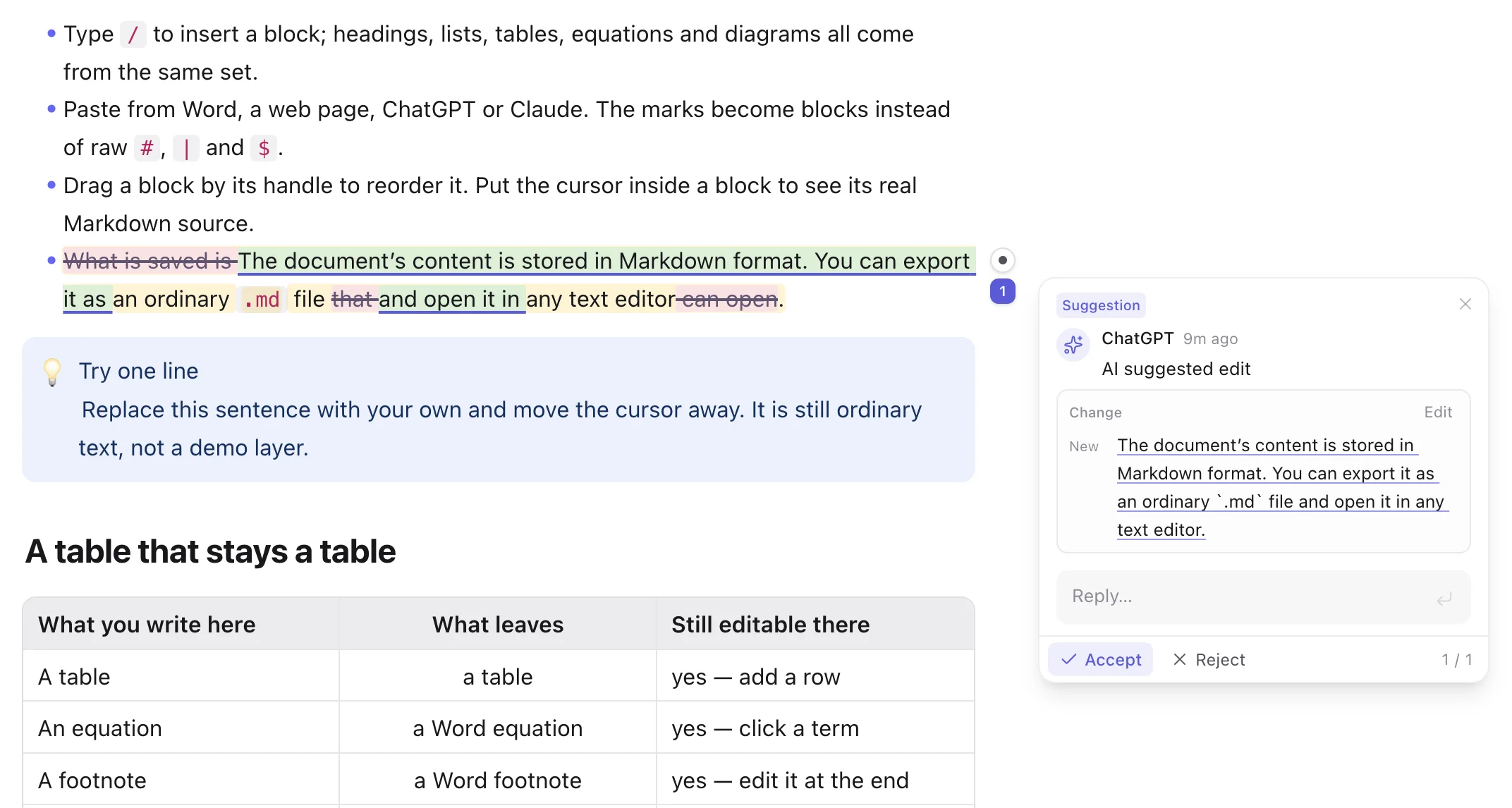
Most editors hand you a rewritten block and a diff in another window. Here the change is drawn where the words are, so deciding never means comparing two versions by eye.
A deletion
The original stays visible, struck through, in the sentence it came from. Nothing is silently replaced.
in place
An insertion
New wording is tinted green exactly where it would land, not parked in a panel for you to map back.
in place
A number
Every suggestion has one, and the counter reads 2 / 4. You always know how many are waiting and which one you are deciding.
margin
The reason
One line from whoever proposed it, on the same card as the buttons. No second message to reconcile with the change.
card
The eye
Hide the marks and the page reads as the finished text. The suggestions stay in the list — hiding is a view, not a decision.
toggle
The quote
Each suggestion is tied to the words it would replace. If the text moved on, it is listed as unplaced rather than dropped into the wrong paragraph.
anchor
Keyboard, if you want it: ⌘⌥N and ⌘⌥P step between suggestions, ⌘⌥A and ⌘⌥X decide the one in front of you — Ctrl+Alt on Windows and Linux.
02Three sources
Three pens reach the page. One of them belongs to a person who never signed up.
The door matters for who pays and what they can see. It does not matter for how the change reaches you: same marks, same card, same two buttons.
01 · In the editor
Built-in AI
The block at your cursor
Pays1 credit
Improve, shorten, translate, redraw a passage as a diagram. It cannot accept its own revision.
02 · suggest_revision
A connected AI app
The latest text, on every call
PaysIts own plan
Claude, ChatGPT, Claude Code or Cursor. Once you have opened the document the server refuses a body write.
03 · Review link
A reviewer
One frozen round
PaysNothing
No account: select the sentence, choose Suggest edit, type the wording. It lands marked, with their name on it.
The reviewer path is the one people miss: one link, no account, and the suggestion lands in the author’s text rather than in an email.
03Deciding
Accept, reject, or fix the wording and then accept.
A suggestion is a sentence someone is proposing, not a verdict. So the card carries the new wording in a field you can edit, a reply box for the argument, and a count that tells you how far through the round you are. Rejecting is not destructive: the text was never changed, so a rejection leaves the paragraph exactly as you wrote it.
One rule
Nothing is applied by the party that proposed it
Not the built-in AI, not a connected app, not a reviewer with the link. Applying is the author’s click, and it is the only write path once the document is yours.
04Track changes, compared
Same job as Track Changes. Opposite direction of travel.
Word’s model is markup that travels with the file: the document accumulates revisions, and someone downstream clears them. JotDoc’s model is a proposal that never enters the file — it is decided at the source, then the export is simply the text.
Swipe to see every column
| Track ChangesWord | SuggestionsJotDoc | |
|---|---|---|
| What the mode is | A switch you turn on before editing | Nothing to switch on — every change from elsewhere arrives this way |
| Who it marks | Whoever edits the file, including you | An AI app or a reviewer. Your own typing is just typing |
| Where you see it | Inline marks and margin balloons | Inline marks, a numbered anchor, and a card in the margin |
| How you decide | Accept or reject, one revision at a time | Accept, reject, or rewrite the wording first — one suggestion at a time |
| Discussing one | A separate comment thread beside it | Reply inside the suggestion card; the thread is the change |
| What leaves the file | The markup can travel inside the .docx | Accepted text only — no marks in Word, PDF or Markdown export |
| Who needs an account | An account for Word on the web | The author, once, to send the link. Reviewers need none |
The practical difference: a reviewer with no account can propose exact wording, and the author never has to reconcile a document against a second copy — the AI’s changes and the reviewer’s arrive in the same list. A comment, by contrast, argues about the sentence and proposes nothing — that object has its own page.
05Boundaries
What this deliberately is not.
Four things people expect from a track-changes feature, and the honest answer to each.
Not a mode for your own typing
You cannot track yourself
There is no Suggesting toggle for the person who owns the document. The asymmetry is the feature: suggestions only ever come from someone else.
Not markup in the file
No revisions inside the .docx
Export writes the document as it reads now. Word files with native revision marks are the MindMax desktop app.
Not real-time
No two cursors in a paragraph
Review is asynchronous on purpose: propose, decide, send a new round. Live co-editing would dissolve the frozen round that makes a comment stay put.
Not a history
No cloud version history
Rounds show what changed between them. Per-keystroke history and rollback live in the desktop app, not in the browser.
06Questions
The ones that decide whether this fits.
Including the one this page exists for: whether it is the same thing as track changes.
Is this the same as Track Changes in Word?
No, and the difference is deliberate. Word tracks whoever edits the file, including you, keeps the markup inside the .docx, and needs a mode switched on before you type. JotDoc marks what someone else proposes — an AI app or a reviewer — and you decide one suggestion at a time. Your own typing is never marked up, and the export contains the accepted text only. If you need revisions that travel inside a Word file, the MindMax desktop app writes native Word revisions: https://mindmax.me/download/
Can I suggest a revision on someone else’s document?
Yes, and you do not need an account. Open the review link, select the sentence, choose Suggest edit and write the wording you would use. The author sees it marked in their text, with your name and your reason attached, and accepts or rejects it like any other suggestion.
Can I rewrite a suggestion before accepting it?
Yes. The card has the proposed wording in an editable field: change two words and accept, and the text lands the way you want it. Accept, reject and edit are the three ways to close a suggestion, and a reply thread can run underneath any of them.
Does an accepted suggestion keep a record?
The accepted text becomes the document, and the thread keeps what was proposed and what you decided. A connected AI can read that outcome through get_review_status, which reports each suggestion as applied or declined, so it does not repeat what you already turned down.
What happens if the sentence changed before I decided?
A suggestion is anchored to the exact words it would replace. If those words are no longer in the document, the suggestion is not placed by guesswork: it moves to an unplaced list where you can still read it, reply, and decline it.
Do suggested revisions cost credits?
Only the built-in AI does — one credit from a weekly allowance of 50 on a free account. A connected AI app spends its own plan and takes nothing from your credits. A reviewer’s suggestion is free, because no model of ours runs to produce it.
Read the change where the words are.
Then keep it, or don’t. The document is the same either way until you decide.
No installation · no account to write · no watermark